Cleaning when overwhelmed
Instead of “clean the whole house,” try pick up one item. If that's too much, just stand next to the item.
When a task feels too large to begin, choose a step small enough to do now. This page gives you a first-step idea and a quiet two-minute timer. No sign-up, account, ads, or promises about willpower.
Name the task. You don't have to plan every part of it.
Or tap an example:
Put one item where it belongs.
Start with an action you can finish without planning the whole task.
Try your first step. Stop after two minutes or keep going — your choice.
You only need to do the next small action.
Now: ADHD Task Starter includes the one-task screen, two-minute starter, Brain Dump, focus timers and daily plan in its free core. Optional Pro adds routines, deeper history, insights and customization.
“Clean the kitchen” is enough. You don't need a perfect list before beginning.
“Put one cup in the sink” is clearer than “be productive.” If it's hard, shrink it again.
You can stop after the timer. Starting does not obligate you to finish the task today.
Instead of “clean the whole house,” try pick up one item. If that's too much, just stand next to the item.
Instead of “finish my essay,” try open the document and type its title. Then see whether a second step feels possible.
Instead of “clear all messages,” try open one message and decide whether to reply, archive, or revisit it.
Instead of “sort every bill,” try find the next due date on one statement. Only deal with that statement first.
Inside Now · actual app screens
A task does not need to be finished to be worth starting. See the one-task screen and two-minute timer in Now.
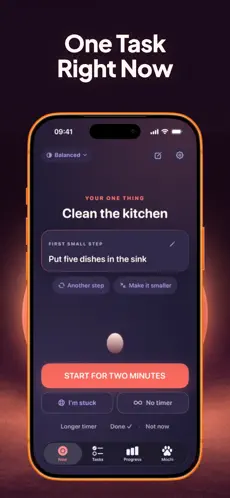
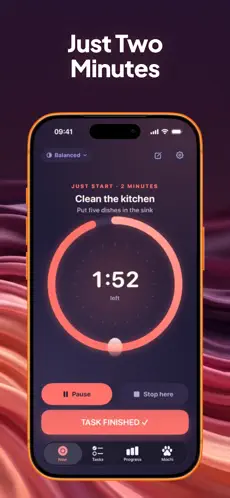
Now: ADHD Task Starter turns a task into an editable first step and a two-minute start. Its core task starter, Brain Dump, focus timers and daily plan are free. Optional Pro adds extra history, routines, insights and customization. It's designed for productivity support, not medical diagnosis or treatment.
Presented by the publisher, Honest Little Apps. Download and pricing details are on Apple's App Store. Requires iOS/iPadOS 18 or later.That's expected. This exercise is for beginning, not for completing everything. If you are in the middle of a safe, useful step, you can keep going. If not, you're allowed to stop.
Choose a physical action: open the document, put one item away, take a pen out, or move one email into a folder. Avoid “get motivated” or “do better” — neither tells you what to do with your hands.
No. This free exercise and its companion app are general productivity aids. They do not diagnose, prevent or treat ADHD or other health conditions.
No. This planner keeps the task and first step in the current page and has no form submission or account. Reloading clears your entry. Wix hosts this site and provides visit analytics, which may store an anonymous browser identifier. The planner does not add task text to its page URL or send it to an analytics service.
Yes. The entire first-step tool and timer work without registration or payment. The separate optional iOS app has a permanent free core and additional paid upgrades.
Enter the tasks and see which one can begin now. A circular dependency gets its own explanation.
Explore a practical worksheet and make a plan in your browser.